—
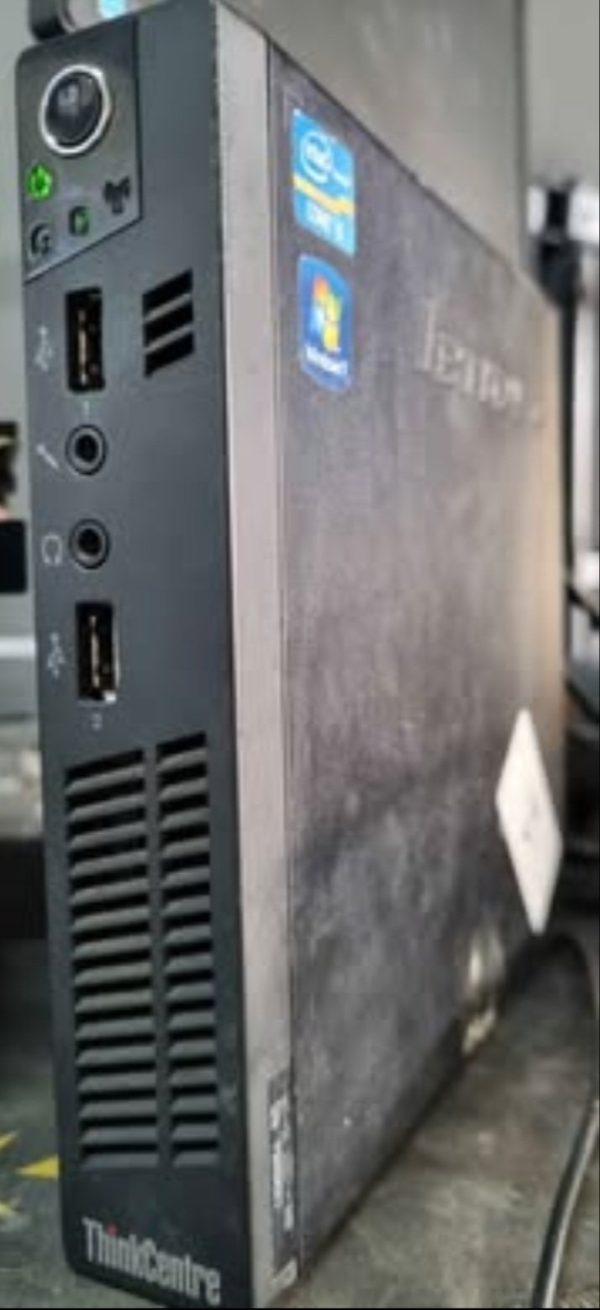
### **Lenovo ThinkCentre M72e Tiny (Mini PC) – Detailed Specifications**
#### **1. Form Factor & Dimensions**
– **Ultra-Compact (Tiny/Mini PC)**
– **Size:** ~1.4L volume (approx. **7.2 x 7.0 x 1.4 inches / 183 x 178 x 35 mm**)
– **Weight:** ~2.7 lbs (1.2 kg)
– **Mounting Options:** VESA-mountable (can be attached behind a monitor)
#### **2. Processor (CPU)**
– **Intel Core i3-3220 (3rd Gen, Ivy Bridge, Dual-Core, 3.3GHz, 3MB Cache)**
– **Integrated Graphics:** Intel HD Graphics 2500
– **TDP:** 55W
#### **3. Memory (RAM)**
– **8GB DDR3 ( 2x 4GB SODIMM)**
– **Max Supported:** 16GB (2x 8GB DDR3L SODIMM)
– **Speed:** 1600 MHz
#### **4. Storage**
– **500GB 2.5″ HDD (SATA II, 5400/7200 RPM)**
– **Upgrade Options:**
– Can be replaced with a **2.5″ SSD** (SATA III) for faster performance
– Support an **mSATA SSD** (if an additional slot is available)
#### **5. Graphics & Display Outputs**
– **Intel HD Graphics 2500 (Integrated)**
– Supports **dual displays** via:
– **1x DisplayPort**
– **1x VGA**
– Max Resolution: **2560×1600 (DisplayPort), 1920×1200 (VGA)**
#### **6. Connectivity & Ports**
– **Rear Ports:**
– **USB 2.0 × 4**
– **DisplayPort × 1**
– **VGA × 1**
– **RJ-45 Gigabit Ethernet × 1**
– **Audio Out × 1**
– **Power Connector × 1**
– **Front Ports:**
– **USB 2.0 × 2**
– **Headphone/Mic Combo Jack × 1**
– **No PCIe Expansion** (completely closed system)
#### **7. Networking**
– **Wired:** Intel Gigabit Ethernet
– **Wireless:** **No built-in Wi-Fi** (must use USB Wi-Fi adapter)
#### **8. Power Supply**
– **65W External Power Adapter** (small brick-style)
#### **9. Operating System**
– Originally shipped with **Windows 7 Pro / Windows 10 Pro**
– Compatible with **Linux (Ubuntu, Debian, etc.)**
#### **10. Optical Drive & Expansion**
– **No Optical Drive Bay**
– **No PCIe Slots** (fully integrated motherboard)
– **Limited Upgrades:** Only RAM and storage can be upgraded
—
### **Performance & Use Cases**
✔ **Best For:**
– Office work (Word, Excel, web browsing)
– Light multitasking (email, PDFs, video calls)
– Digital signage / kiosk
– Home theater PC (HTPC) for 1080p streaming
✖ **Not Suitable For:**
– Gaming (no dedicated GPU, weak integrated graphics)
– Heavy multitasking (video editing, large databases)
– Modern AAA applications
—
### **Pros & Cons**
✅ **Pros:**
– Extremely compact, fits anywhere
– Energy-efficient (low power consumption)
– VESA-mountable (saves desk space)
– Reliable for basic office tasks
❌ **Cons:**
– **No Wi-Fi/Bluetooth** (must use USB adapters)
– **Limited USB ports** (only 6 total, all USB 2.0)
– **No SSD by default** (HDD is slow)
– **No upgradeability beyond RAM & storage**
—
### **Upgrade Recommendations**
1. **Replace HDD with SSD** (SATA III, e.g., Samsung 870 EVO) → **Biggest performance boost!**
2. **Upgrade RAM to 16GB** (if needed for more apps/tabs).
3. **Add USB 3.0 via a hub** (since all ports are USB 2.0).
4. **Use a USB Wi-Fi adapter** (if wireless is needed).
—
### **Final Verdict**
The **Lenovo ThinkCentre M72e Tiny** is a **tiny but capable** business PC for basic computing. It’s perfect for **space-constrained offices, reception desks, or light home use**, but its **lack of modern ports (USB 3.0, Wi-Fi) and non-upgradeable GPU** limit its versatility.
Would you like recommendations for similar but more modern mini PCs?




Reviews
There are no reviews yet.